
All your agents, from all your machines. And teams that work on their own.
Already using Claude Code, Codex or Copilot? See and approve them all in one place, from any machine, even your phone. Not yet? Say in plain words what you want: Fleetly sets up the agent on your computer and builds the team, no terminal needed.
14 days of everything, no card. Then free forever on one machine.
No password to leak · no open ports · credentials never read
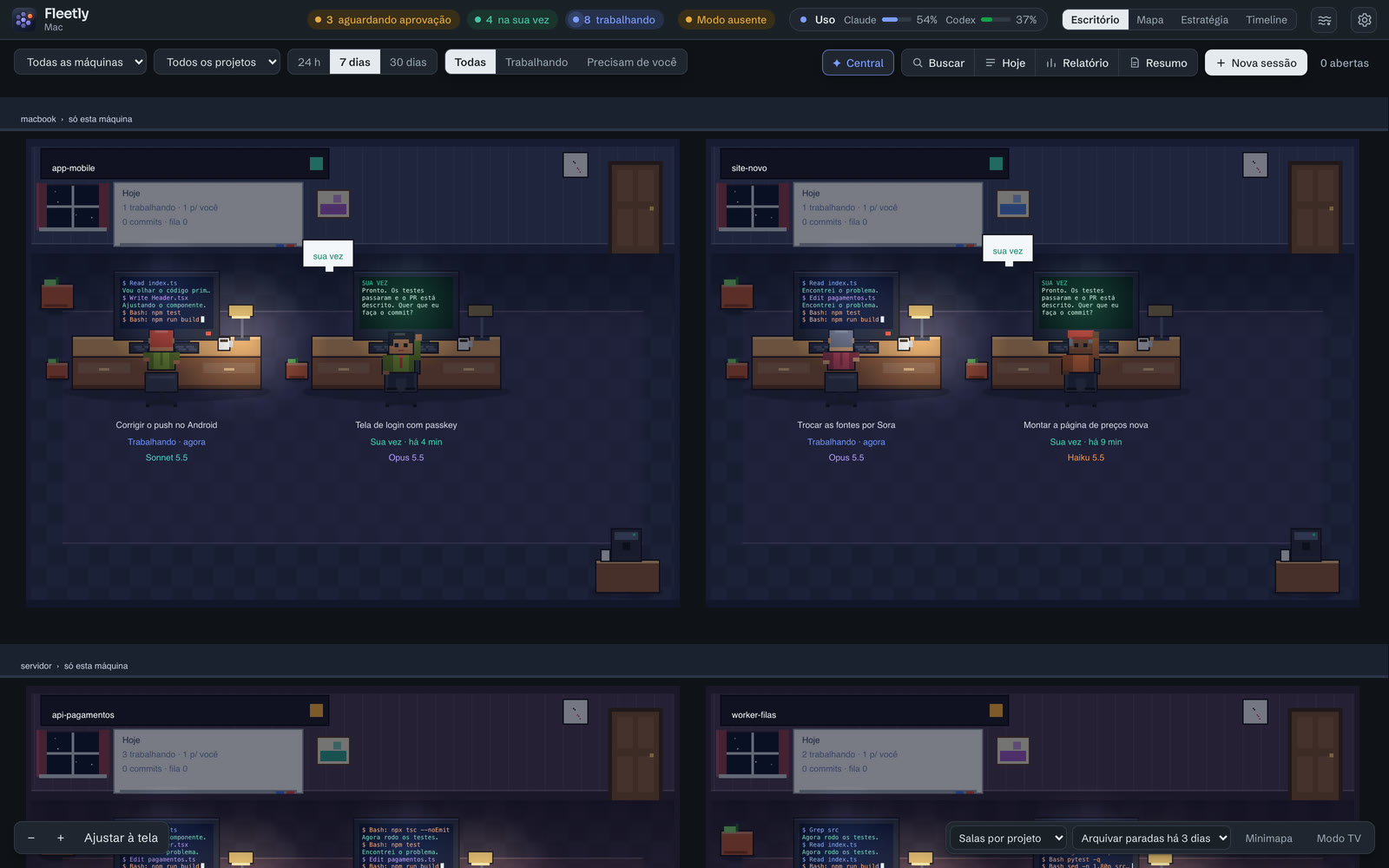
Delegate, follow and govern. The way you already work.
Build a team of agents. It works on its own.
One builds, another reviews. You just approve. Build the team in an org chart, from a template. Each seat is a Claude, Codex, Antigravity or Copilot session with its role; when one finishes its part, the work moves along the arrows to the next.
Claude, Codex, Antigravity and Copilot on one team
Claude builds, Codex reviews and Antigravity tests. If it’s rejected, the work goes back to whoever built it, with a cap on round trips.
Each seat on someone’s machine
Invite a teammate to a seat: the agent runs on their machine, with their account, and the code goes through the team branch.
Run it and see it working
One tap starts the project and shows the app’s address, on your phone too.
Publish with one tap
At the end of the round, the notification comes with Approve: it opens the pull request, and merging stays with you.
One agent checks the other. And your client approves from their phone.
Before you approve, another agent on your computer reviews what changed. Then the client sees the delivery through a link, no account, and replies.
One agent checks the other
Codex reads what Claude changed (or the other way around) and says in plain words what it found. It only reads. Redo with the points sends it back to whoever did the work.
The client approves by link
Send the delivery via WhatsApp. The client opens it on their phone, sees the files and the running app, and taps Approve or Ask for a change. The request only reaches the agent when you send it.
From the first agent to the team that works on its own.
In 3 minutes: connecting the machine, asking and approving, the Board, building the team, the round at work and the pull request at the end. The demo is in Portuguese for now.
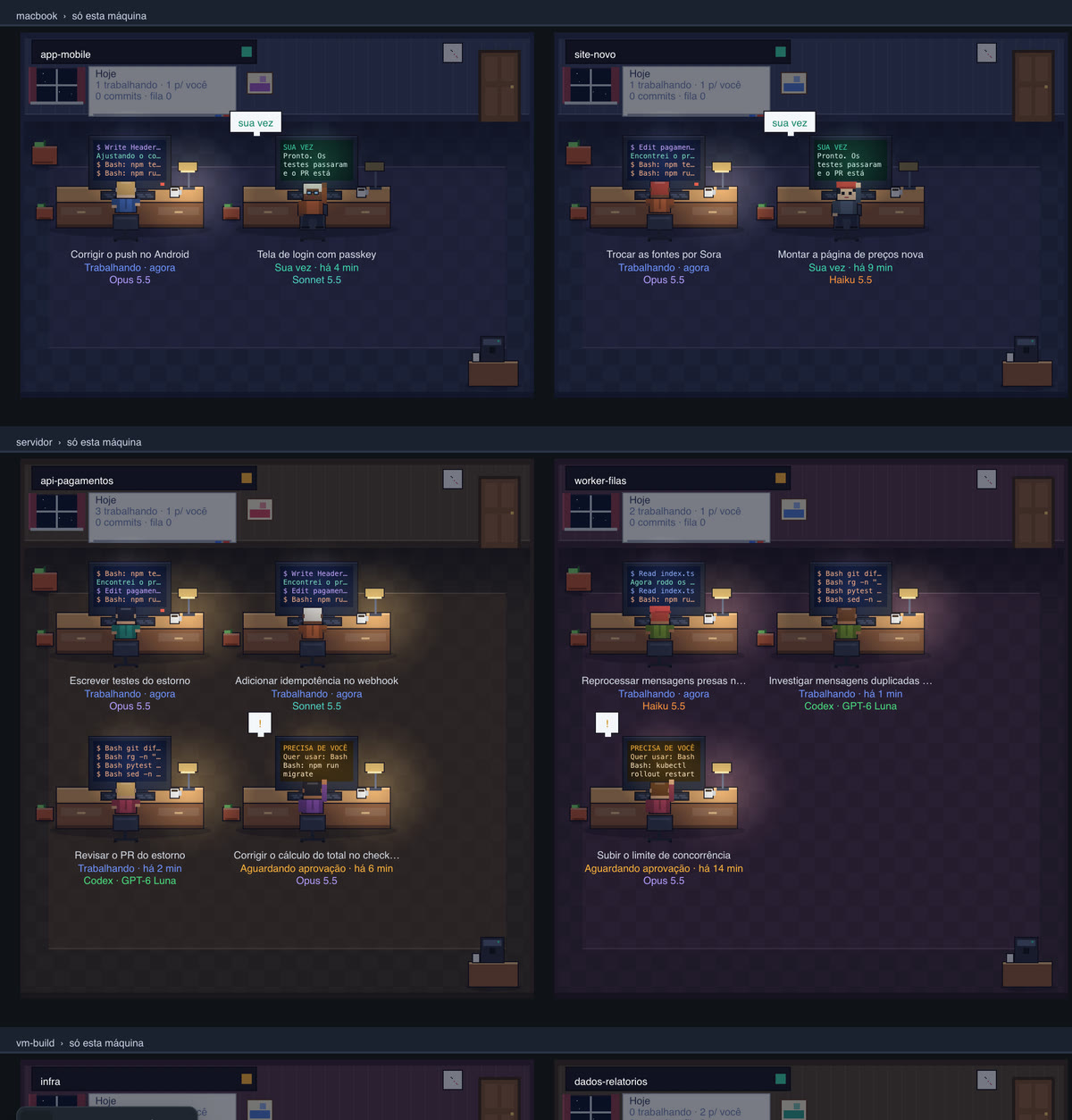
Each machine is a floor. The whole fleet, one building.
Install the collector on every machine that runs agents: your Mac, the production server, the build VM. They show up together in Fleetly within seconds.
An app or one line
On Mac and Windows, download the app and sign in with your account. On servers and VMs, one line in the terminal. The collector starts on its own.
No open ports
The collector only makes outbound connections. Server behind a firewall? Works the same.
Mac, Linux and Windows
Laptop, desktop, dedicated server, cloud VM. Anywhere Claude Code, Codex, Antigravity or GitHub Copilot is signed in.
Updates itself
Nothing to maintain. A machine that goes offline shows its last known state.
curl -fsSL https://ai.fleetly.tools/install.sh | bash -s -- --token <machine-token>Three things you won’t find in another dashboard.
Many machines, Claude, Codex, Antigravity and Copilot together
Laptop, server and VM in one dashboard. Sessions from VS Code and the terminal show up on their own, without changing how you start the agent.
Find any session
“a1 deploy” takes you to the session that did the deploy, not just the ones that talked about it. With nothing typed, the ones you opened last.
Accept all, with the policy in force
In a session you trust, requests go through right away. Blocks and two-person approval still apply, and every approval is in the trail.
Spend fewer tokens
Fleetly warns you when a long conversation’s cache has expired and offers to start over with a summary, in a new session.
The server asked. You approved it in the coffee line.
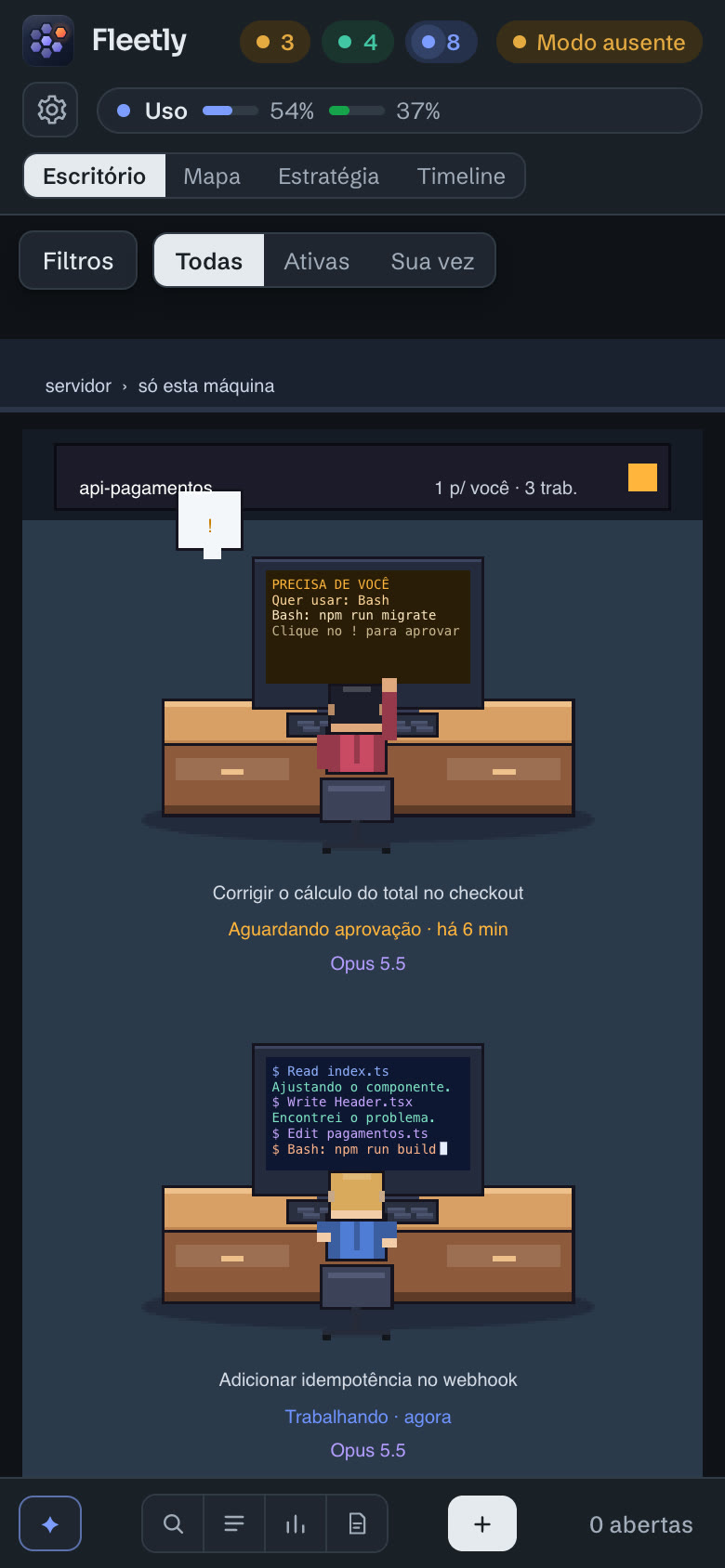
When an agent on any machine asks for permission, you get a push on your iPhone or Android. You see the exact command and approve or deny it right there.
- Push notifications with the command and the machine
- The whole office fits on the screen
- Face ID to sign in, no password
Agents with access to your servers deserve a well-locked door.
Fleetly was built to connect production machines without opening a single port, without passwords and without touching your credentials. The agents keep running where they are, on your account.
Code stays on the machine
Agents run and read files where they are. Only session state and the conversations and files you open go through the hub.
Outbound, encrypted connections only
No open ports on your machines. Each one has its own token, which you can revoke at any time.
No password to leak
A passkey (Face ID, Touch ID or a security key) or your Google, Microsoft or Apple account. Nothing to leak, and too many attempts get blocked.
Your credentials stay put
Fleetly never reads your Claude Code, Codex, Antigravity or GitHub Copilot sign-in. It only checks that one exists.
You approve what runs
Permission requests are still yours. Fleetly just brings them to you, wherever you are.
Everything audited
Sign-ins, approvals, messages, commits and pushes, with the person, machine and time.
Verified collector
The collector updates itself and checks the hash of every file before running it.
Roles and lockout
Owner, operator or viewer. End someone’s sessions or lock their account instantly.
For people coding on their own. For people running a team.
You and your agents
- All your machines in one dashboard, with Claude Code, Codex, Antigravity and GitHub Copilot
- Approve, reply and test the app from your phone
- Routines and teams working while you sleep
- The plan you pay for, put to good use: window leftovers, cache and usage
A team with agents
- Teams with people at home, in the office or at another company, each on their own machine
- Cost per project and the weekly retro, never a ranking of people
- Roles, building policy, command blocking and audit
- SSO, SCIM and reports on Enterprise
For you today. For your team tomorrow.
Each dev already costs $100–200 a month on a Max plan. Fleetly helps you see, approve and govern that usage.
One machine: see all your agents, get the notifications and approve their requests from your phone. To send work, reply and build teams, Personal.
Start freeJust you, 1 building and up to 2 machines. Agent teams on your machines, every view, Claude Code, Codex, Antigravity and GitHub Copilot, preview and mobile.
Sign upAgent teams with your team, each seat on someone’s machine. Invites and roles, multiple buildings, 5 machines per person and command blocking. Viewers are free.
Sign upFull agent governance: allowed folders, network, branches, hours and models, two-person approval, secret masking, SSO and SCIM, auditor role, reports and agent trail. Unlimited machines.
Talk to usEvery plan starts with 14 days of everything, no card. Then you stay on Free or subscribe. Billing in Brazilian reais (BRL).
What everyone asks.
What is an agent team?
An org chart of Claude Code, Codex, Antigravity and GitHub Copilot agents, each with a role (who builds, who reviews, who tests). You write the request; when a seat finishes, the work moves along the arrows to the next one, until the end of the round, when the notification reaches your phone so you can approve the pull request. Each seat can run on a different person’s machine.
Is Fleetly made by Anthropic, OpenAI, Google or GitHub?
No. It’s an independent product for people who use Claude Code, Codex, Antigravity and GitHub Copilot.
Does it work with Codex?
Yes. Codex CLI sessions show up with their own badge next to the Claude Code ones, and you can chat with them and start new ones from the dashboard.
Does it work with Google’s Antigravity?
Yes. Antigravity CLI (`agy`) sessions show up with their own badge: you can chat, start new sessions with your account’s models, approve from your phone in the sessions the dashboard starts, and put Antigravity in roles and teams, next to Claude Code and Codex.
Does it work with GitHub Copilot?
It does. GitHub Copilot CLI (`copilot`) sessions show up with their own badge: you chat, start new sessions on Copilot Auto or with a model from the list, approve from your phone in sessions the dashboard starts, and put Copilot in roles and teams, next to Claude Code, Codex and Antigravity. What counts is your Copilot subscription.
Which machines can I connect?
Mac, Linux and Windows: your laptop, your desktop, servers and cloud VMs. Each one only needs Claude Code, Codex, Antigravity or GitHub Copilot signed in (the installer offers to install what’s missing): if the machine has no Node, the installer downloads one just for the collector.
Do I need to open a port or set up a VPN?
No. The collector only makes outbound connections to Fleetly. It works behind firewalls and NAT.
Does my code leave my machine?
Agents run and read files on the machine itself. Only session state and the conversations and files you open in the dashboard go through the hub, always over an encrypted connection, and they aren’t stored there. Secret files such as `.env` don’t open in the dashboard. Your Claude Code, Codex, Antigravity and GitHub Copilot credentials are never read.
Can I test the app the agent is building on my phone?
Yes. When the session starts a dev server, tap Open preview and the app opens on your phone at an address only you can use, with no tunnel and no open port. When the agent changes a file, the page reloads on its own.
Is it safe to connect a production server?
That’s what Fleetly was designed for: outbound connections only, a per-machine token you can revoke any time, passwordless sign-in (passkey or Google, Microsoft and Apple) and an audit log of every action. Permission requests are still yours. Details are on the security page.
How much does it cost?
Personal is R$ 49 a month and Team is R$ 79 per person (viewers are free). Enterprise is priced on request. Billing is in Brazilian reais (BRL). Every plan starts with 14 days of everything, no card; after that, Free keeps going on one machine, to see and approve.
Does it work with VS Code?
Yes. Sessions opened from the Claude Code extension in VS Code show up in the office like any other. To carry one on from your phone, use Take over in Fleetly.
Do I need to change how I start Claude Code, Codex, Antigravity or GitHub Copilot?
No. The collector picks up the sessions that already exist, whether opened in a terminal or in VS Code. You keep using claude, codex and agy as usual.
How is this different from Claude Code Remote Control?
Remote Control opens one session from your computer in the Claude app, and it’s great at that. Fleetly brings together the sessions from all your machines, Claude Code, Codex, Antigravity and GitHub Copilot alike, shows who is waiting on you across the whole fleet, brings the app preview to your phone and gives teams roles and an audit log. They work together: with Remote Control on, the dashboard shows a button to continue in the Claude app.
Your agents are already fast. Now you are too.
Create your account with a passkey or with Google, Microsoft or Apple and connect your first machine in minutes.