
Enterprise: policy, SSO and reports
On Enterprise, the building’s owner sets rules that apply before every action the agents take, on the machines, and follows everything in reports. Command blocking is also on Team. For an overview to evaluate it or show your company, see Governance.
Where to set it up
In Settings → Buildings, pick the building. The policy, SSO, locks and audit log are in Security; invites in People; who pays and usage in Plan. Reports are in Settings → Reports, for the owner and the auditor.
The rules rely on Fleetly’s hooks on the machine (installed with --hook; on Codex, approved under Review hooks in VS Code or /hooks in the terminal). On a machine without them, the policy doesn’t apply. The Security report shows which machines are protected.
Commands
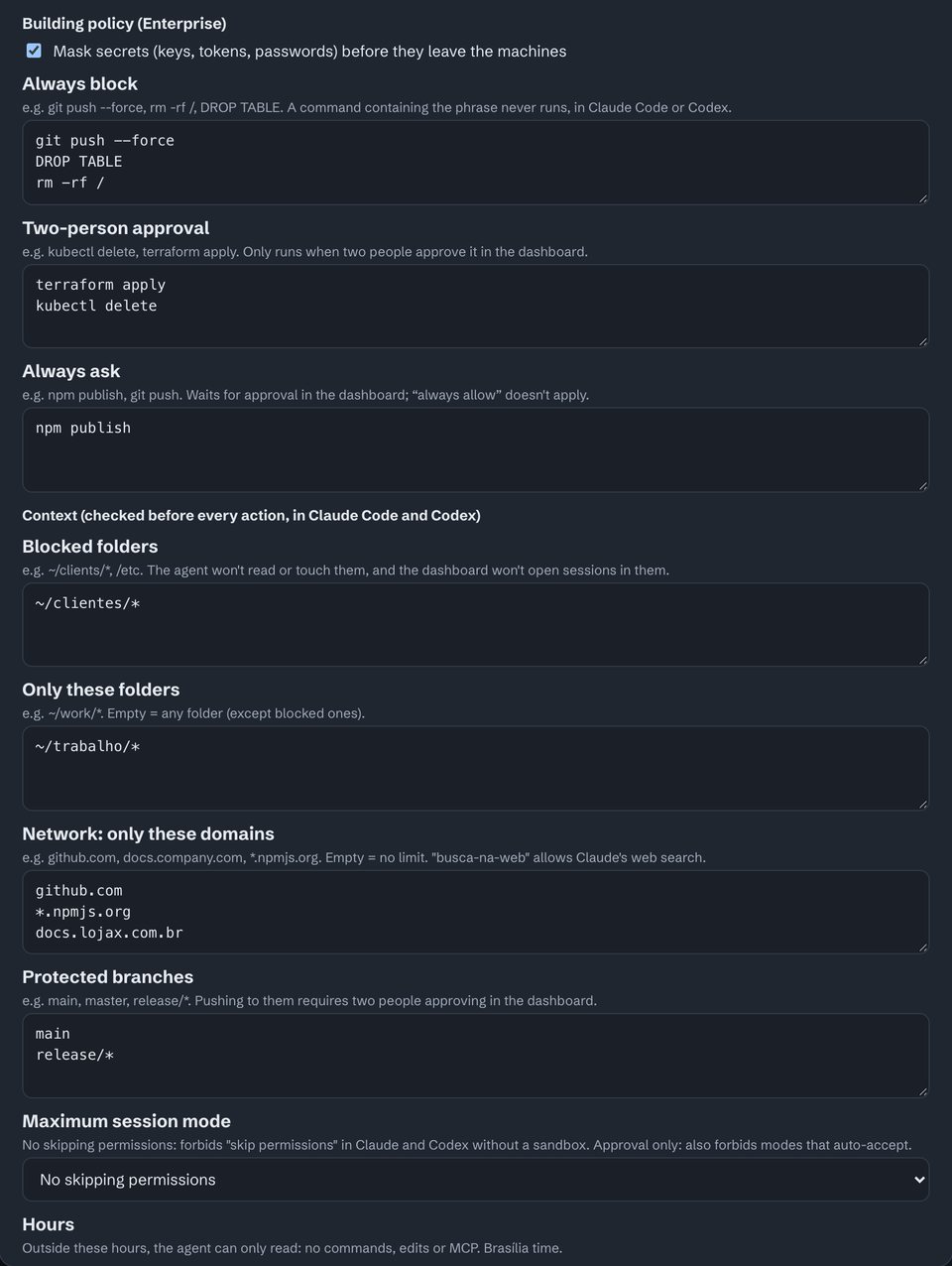
One rule per line. A rule matches when the command contains the phrase, case-insensitive, and it also applies in auto mode.
| Rule | Plan | What it does |
|---|---|---|
| Always block | Team and Enterprise | The command never runs, in Claude Code or Codex. E.g. git push --force, DROP TABLE. |
| Two-person approval | Enterprise | Runs only with two different people approving in the dashboard. E.g. terraform apply. |
| Always ask | Enterprise | Waits for approval in the dashboard, and "always allow" doesn’t apply. E.g. npm publish. |
Before saving, Simulate on the last week shows how many times the policy would have blocked, asked for two-person approval or asked. Once saved, it applies on the machines within seconds.
Context
| Field | What it does |
|---|---|
| Mask secrets | Keys, tokens and passwords become ••• on the machine itself, before anything leaves for the hub. |
| Blocked folders | The agent doesn’t read or touch them, and the dashboard doesn’t open sessions there. E.g. ~/clients/*. |
| Only these folders | The agent works only inside them. Empty: any folder except the blocked ones. |
| Network: only these domains | E.g. github.com, *.npmjs.org. Empty: no limit. busca-na-web allows Claude’s web search. |
| Protected branches | Pushing to them requires two people approving. E.g. main, release/*. |
| Maximum session mode | "No skipping permissions" forbids skipping permissions in Claude and Codex without its sandbox. "Approval only" also forbids the modes that accept on their own. |
| Hours | Outside them, the agent only reads: no commands, edits or MCP. Brasília time. |
| Only these models | E.g. sonnet, haiku. The dashboard also won’t open or switch to another. With Outside the list, ask for approval instead of blocking, each action by another model (Opus, for example) waits for approval from the dashboard or the phone. |
| Only these MCP servers | The server name, as it shows in mcp__<name>__…. |
| Minimum version | Of Claude Code, Codex, Antigravity CLI and GitHub Copilot CLI. Below it, the agent doesn’t act until it updates. |
| Required protection on machines | "Fleetly’s hooks" or "Managed hooks" (that people can’t turn off). Below it, the machine is read-only on the dashboard. Without requiring it, the building is still alerted when a machine’s protection drops. |
| Fix automatically | If the Fleetly hooks leave the person’s settings, the app writes them again (backing up the file first). The drop and the fix go to the audit log. Off by default. |
| People’s sessions in the panel | Maximum sign-in duration (in hours): after it, the building disappears from the dashboard until the person signs in again. Only from these networks (IP or CIDR range): from outside, the building doesn’t show in the dashboard or the app; the address of whoever saves must be on the list. Require a recent sign-in: changing the policy, roles, invites, SSO and integrations needs a sign-in from the last 15 minutes. |
| Retention | How long the audit log and what agents did are kept: 180 days (the minimum), 1, 2, 5 or 10 years. Legal hold: nothing from the building is deleted while it’s on; who turned it on and off stays in the policy history. |
Folders the machine doesn’t show the building are outside the policy.
A machine’s own policy
In Settings → Buildings → Machines, when you tap a machine, the Own policy button opens the same editor, just for it. That policy applies together with the building’s and only tightens: when both cover the same thing, the stricter one wins. It’s useful, for example, for the production server to block commands the rest of the building may run. When it’s on, the button shows Own policy (on).
Managed protection
By default, Fleetly’s hooks live in the settings of whoever uses the machine, and they can remove them. To make only IT able to remove them, install them in Claude Code’s managed settings. On the machine, as an administrator:
sudo fleetly-collector hooks --gerenciado--so-gerenciados: only managed hooks apply; personal and project hooks are ignored.--sem-pular: nobody can use "bypass permissions" on that machine.--imprimir: only prints the file, to deploy through your MDM (Jamf, Intune and others).
On Windows, run it in a terminal opened with Run as administrator, without sudo. The Inventory shows each machine’s protection: Managed, Personal or None. When a machine’s protection drops, owners and auditors get an alert and the event goes to the audit log.
SSO and SCIM
- Email domains: add the company domain and create the TXT record the dashboard shows in its DNS. Then tap Verify.
- Sign-in provider (OIDC): Entra ID, Okta, Google Workspace, Keycloak or another. In the provider, create a web app with the redirect URL the dashboard shows and the
openid email profilescopes. Anyone signing in through SSO with an email on the domain joins the building with the role you choose. - Require SSO (optional): anyone signing in another way can’t see the building. An owner who signs in with a passkey sees a bar with Sign in with SSO or Emergency access…, which asks for a reason: with it, the building shows in that session for up to 12 hours, and the other owners get a phone and email notice with the reason, which also goes to the audit log.
- SCIM (optional): turn on provisioning in the provider with the URL and a token from here. Removing a person there takes them out of the building and ends their sessions immediately.
Reports
In Settings → Reports, for the owner and the auditor. All of them can be printed or saved as PDF.
| Report | What it shows |
|---|---|
| Executive | The month: agent hours, tokens, estimated cost, commits, active people and the projects that used the most, compared with the previous month. |
| Cost and budget | Tokens and estimated cost per project, with the budgets. |
| Access | Each person’s sign-ins, sessions open now and access changes in the building. |
| Access review | Every period, the owner confirms who keeps access; when it’s done, whoever was marked to revoke leaves the building. |
| Agent trail | Every agent action on the machines (command, file, project), with who authorized it and whether it was through the dashboard or on the machine. Secrets arrive masked. |
| Who saw what | What each person opened from the building’s machines: chats, diffs, attachments, folders and searches. |
| Security | Sensitive commands, denied approvals and which machines have the hooks. |
| Inventory | The machines, with the Claude Code, Codex, Antigravity, GitHub Copilot and collector versions, the hooks and each machine’s protection. |
| Integrity | A signed attestation of the audit log: records are chained, and any auditor can check with the public key whether something was changed or deleted. Every day a signed copy goes to locked storage outside the database (the anchors, checked in the attestation): a change in the database, even by someone with access to it, stops matching. |
| Integrations | Sends the audit log and the agent trail to the company SIEM and creates read API tokens (below). |
Email delivery: add recipients for the executive report (monthly) or the access report (monthly or weekly). The email carries the summary and the CSV. The building’s audit log also exports to CSV in Settings → Buildings.
Integrations (SIEM and API)
In Settings → Reports → Integrations, the owner adds up to 5 destinations. Every 30 seconds, whatever is new goes out in batches; a failed delivery is retried without skipping anything. A new destination starts from now on.
| Destination | How |
|---|---|
| Webhook | A POST with the batch as JSON. The secret is shown once, when created. To verify: x-fleetly-assinatura is sha256= plus the HMAC-SHA256 of the secret over <x-fleetly-momento>.<body>. |
| Splunk HEC | The HEC address (…/services/collector/event) and the token. |
| Datadog Logs | Your region’s intake address and the API key. |
| Company bucket (S3, JSONL) | Any S3-compatible service (AWS, OCI, Google Cloud, MinIO, Cloudflare R2): the address https://<service>/<bucket> (optionally followed by a folder), the region, the access key and the secret. Every 10 minutes, a compressed JSONL file in fleetly/<building>/<day>/. Use a key that can only write to that bucket. |
What to send: audit log and agent trail, audit log only, or important events only (policy changed, protection dropped, budget reached, roles and members, blocks, emergency access, SSO and integrations, a permission request waiting for 15 minutes, a machine offline for 10 minutes and its return), handy for Slack or Teams. Those last three also go into the building’s audit log, as system events. Test sends a test record.
Read API: create a service token (30 to 365 days; shown once) and pull GET /api/integracao/auditoria or /api/integracao/trilha with Authorization: Bearer <token>, ?desde=<last id received> and ?limite= (up to 1000). The response includes proximo for the next call. Read-only and only for the token’s building.
Cost and budget
In Settings → Reports → Cost and budget, the owner and the auditor see two numbers:
- Estimated: each answer’s tokens times the model’s list price, per day, project, machine and agent. For people on a subscription (Pro, Max, Plus, Team), it’s the value of the work at API prices.
- Billed: what Anthropic and OpenAI actually charged, through their cost APIs. To turn it on, paste an admin key from each provider; it’s checked before it’s stored, and kept encrypted.
- End-of-month forecast, from the average of the last 7 days.
The owner sets a monthly budget, in dollars, for the building, a project or a machine. Owners are notified at 50%, 80% and 100%. At 100%, if the owner chooses, agents start asking for approval for commands and edits, or only read. The lock lifts on its own when the month turns or when the limit goes up. The budget reacts with up to 3 hours of delay: it’s a management ceiling, not a cut to the cent.
Auditor
The auditor role reads the audit log, reports and who saw what, without seeing sessions or chats and without acting. Auditors don’t take a paid seat. Roles are in Buildings, people and roles.
Didn’t find what you were looking for? Write to admin@fleetly.tools.